主题修改记录,避免改不回来
基本美化设置
Argon 主题设置
背景不透明度:0.8,刚刚好
主题色:#5e72e4(默认就很耐看,不改也行)
夜间模式:跟随系统自动切换,懒人福音
卡片圆角:15px,看起来更柔和
卡片阴影:浅浅的就好,低调不抢戏
页面背景图:https://t.alcy.cc/ycy(二次元自适应),网站:栗次元 API – 举个栗子
Banner 显示状态:全屏
Banner 透明化:开启
Banner 标题打字动画:开启
美化后台界面:用户--> 个人资料,管理界面配色方案选择 Argon
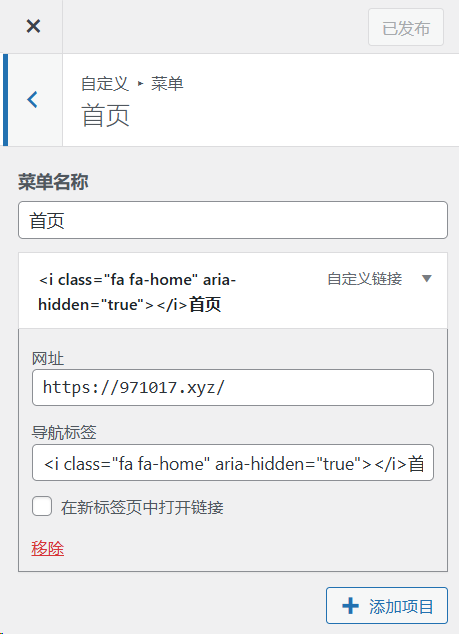
菜单前添加图标
Argon 主题内置了 Font Awesome 4.7.0 图标库。所以只需要在前面添加代码即可。
详情见 Argon 官方文档
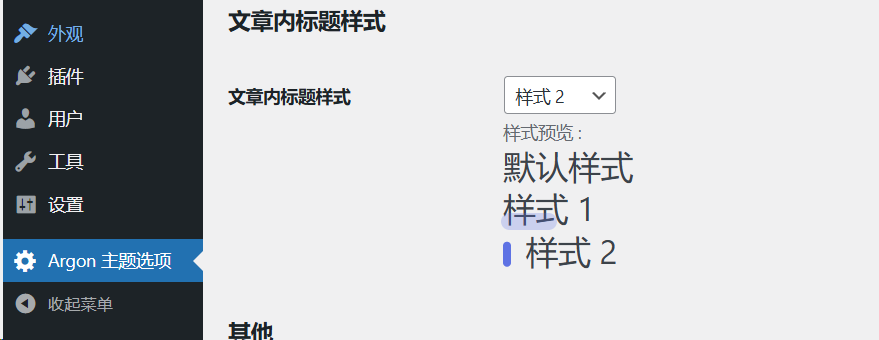
添加小竖线
在 WordPress 后台 – Argon 主题选项中,找到文章内标题样式
左侧个人栏组件
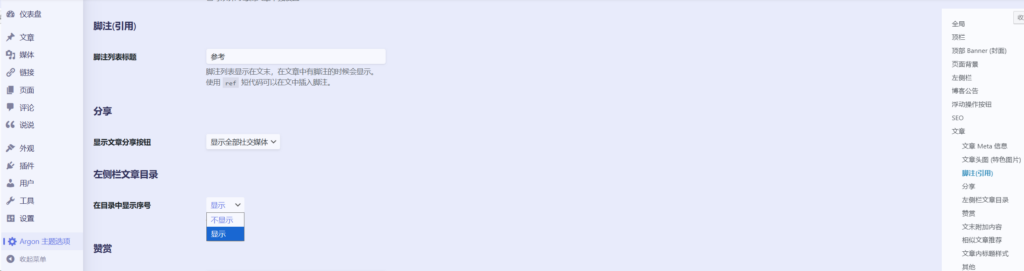
左侧栏文章目录添加序号
Argon 主题设置中提供了这一选项
添加 60s 懂世界
获取 Token
注册 Alapi 账号 www.alapi.cn,在个人中心即可看到自己的 Token
调用 API
在外观-小工具,将下面的 api 替换成自己的,这里展示以图片形式插入的
https://v2.alapi.cn/api/zaobao?token=替token换&format=image年度倒计时显示
外观-小工具-站点概览额外内容中插入简码
<div class="progress-wrapper" style="padding: 0">
<div class="progress-info">
<div class="progress-label">
<span id="yearprogress_yearname"></span>
</div>
<div id="yearprogress_text_container" class="progress-percentage">
<span id="yearprogress_progresstext"></span>
<span id="yearprogress_progresstext_full"></span>
</div>
</div>
<div class="progress">
<div id="yearprogress_progressbar" class="progress-bar bg-primary"></div>
</div>
</div>
<script no-pjax="">
function yearprogress_refresh() {
let year = new Date().getFullYear();
$("#yearprogress_yearname").text(year);
let from = new Date(year, 0, 1, 0, 0, 0);
let to = new Date(year, 11, 31, 23, 59, 59);
let now = new Date();
let progress = (((now - from) / (to - from + 1)) * 100).toFixed(7);
let progressshort = (((now - from) / (to - from + 1)) * 100).toFixed(2);
$("#yearprogress_progresstext").text(progressshort + "%");
$("#yearprogress_progresstext_full").text(progress + "%");
$("#yearprogress_progressbar").css("width", progress + "%");
}
yearprogress_refresh();
if (typeof yearProgressIntervalHasSet == "undefined") {
var yearProgressIntervalHasSet = true;
setInterval(function () {
yearprogress_refresh();
}, 500);
}
</script>
<style>
#yearprogress_text_container {
width: 100%;
height: 22px;
overflow: hidden;
user-select: none;
}
#yearprogress_text_container > span {
transition: all 0.3s ease;
display: block;
}
#yearprogress_text_container:hover > span {
transform: translateY(-20px);
}
</style>
额外链接
在外观-小工具,额外内容添加HTML代码
<div class="site-friend-links" style="padding: 10px 15px;">
  <ul class="site-friend-links-ul" style="list-style: none !important; padding: 0 !important; margin: 0 !important; border: none !important;">

    <li class="site-friend-links-item" style="list-style-type: none !important; margin-bottom: 14px !important; border: none !important; background: none !important; padding: 0 !important;">
      <a href="https://t.me/IPFly_Flynn" rel="noopener" target="_blank" style="display: inline-flex !important; align-items: center !important; text-decoration: none !important; border: none !important; background: none !important; padding: 0 !important; outline: none !important; color: #3c4858 !important; font-size: 14px !important; font-weight: 500 !important; font-family: inherit !important;">
        <i class="fa fa-telegram" aria-hidden="true" style="font-size: 16px !important; width: 20px !important; margin-right: 8px !important; display: inline-block !important; border: none !important; background: none !important;"></i>
        <span>Telegram</span>
      </a>
    </li>

    <li class="site-friend-links-item" style="list-style-type: none !important; margin-bottom: 14px !important; border: none !important; background: none !important; padding: 0 !important;">
      <a href="https://971017.xyz/feed/" rel="noopener" target="_blank" style="display: inline-flex !important; align-items: center !important; text-decoration: none !important; border: none !important; background: none !important; padding: 0 !important; outline: none !important; color: #3c4858 !important; font-size: 14px !important; font-weight: 500 !important; font-family: inherit !important;">
        <i class="fa fa-rss" aria-hidden="true" style="font-size: 15px !important; width: 20px !important; margin-right: 8px !important; display: inline-block !important; border: none !important; background: none !important;"></i>
        <span>RSS订阅</span>
      </a>
    </li>

    <li class="site-friend-links-item" style="list-style-type: none !important; margin-bottom: 0 !important; border: none !important; background: none !important; padding: 0 !important;">
      <a href="https://dh.971017.xyz" rel="noopener" target="_blank" style="display: inline-flex !important; align-items: center !important; text-decoration: none !important; border: none !important; background: none !important; padding: 0 !important; outline: none !important; color: #3c4858 !important; font-size: 14px !important; font-weight: 500 !important; font-family: inherit !important;">
        <i class="fa fa-map-signs" aria-hidden="true" style="font-size: 15px !important; width: 20px !important; margin-right: 8px !important; display: inline-block !important; border: none !important; background: none !important;"></i>
        <span>资源导航</span>
      </a>
    </li>

  </ul>
</div>
页脚
页脚内容美化,包含备案信息、运行时间等元素
<link rel="stylesheet" href="https://cdnjs.admincdn.com/font-awesome/4.7.0/css/font-awesome.min.css">

<style>
/* 核心样式保持不变 */
.github-badge {
    display: inline-block;
    border-radius: 4px;
    text-shadow: none;
    font-size: 13.1px;
    color: #fff;
    line-height: 15px;
    margin-bottom: 5px;
    font-family: "Open Sans", sans-serif;
}
.github-badge .badge-subject {
    display: inline-block;
    background-color: #4d4d4d;
    padding: 4px 4px 4px 6px;
    border-top-left-radius: 4px;
    border-bottom-left-radius: 4px;
    font-family: "Open Sans", sans-serif;
}
.github-badge .badge-value {
    display: inline-block;
    padding: 4px 6px 4px 4px;
    border-top-right-radius: 4px;
    border-bottom-right-radius: 4px;
    font-family: "Open Sans", sans-serif;
}
.github-badge-big {
    display: inline-block;
    border-radius: 6px;
    text-shadow: none;
    font-size: 14.1px;
    color: #fff;
    line-height: 18px;
    margin-bottom: 7px;
}
.github-badge-big .badge-subject {
    display: inline-block;
    background-color: #4d4d4d;
    padding: 4px 4px 4px 6px;
    border-top-left-radius: 4px;
    border-bottom-left-radius: 4px;
}
.github-badge-big .badge-value {
    display: inline-block;
    padding: 4px 6px 4px 4px;
    border-top-right-radius: 4px;
    border-bottom-right-radius: 4px;
}
/* 颜色类 */
.bg-orange { background-color: #ec8a64 !important; }
.bg-red { background-color: #cb7574 !important; }
.bg-apricots { background-color: #f7c280 !important; }
.bg-casein { background-color: #dfe291 !important; }
.bg-shallots { background-color: #97c3c6 !important; }
.bg-ogling { background-color: #95c7e0 !important; }
.bg-haze { background-color: #9aaec7 !important; }
.bg-mountain-terrier { background-color: #99a5cd !important; }
.bg-green { background-color: #7dc06e !important; }

#footer-content {
    text-align: center;
    padding: 20px;
    margin-top: 30px;
    clear: both;
}
</style>

<div class="github-badge-big">
    <span class="badge-subject"><i class="fa fa-id-card"></i> 备案号</span>
    <span class="badge-value bg-orange">
        <a href="https://icp.redcha.cn/beian/ICP-2026050350.html" title="茶ICP备2026050350号" target="_blank" one-link-mark="yes">茶ICP备2026050350号</a>
    </span>
</div>

<div class="github-badge-big">
    <span class="badge-subject"><i class="fa fa-wordpress" aria-hidden="true"></i> Powered</span>
    <span class="badge-value bg-green">
        <a href="https://cn.wordpress.org/" target="_blank" one-link-mark="yes">WordPress</a>
    </span>
</div>

<div class="github-badge-big">
    <span class="badge-subject">Copyright</span>
    <span class="badge-value bg-red">2026 <i class="fa fa-copyright"></i> flynn</span>
</div>

<div class="github-badge-big">
    <span class="badge-subject"><i class="fa fa-clock-o"></i> 运行时间</span>
    <span class="badge-value bg-apricots">
        <span id="blog_running_days" class="odometer odometer-auto-theme"></span> 天
        <span id="blog_running_hours" class="odometer odometer-auto-theme"></span> 时
        <span id="blog_running_mins" class="odometer odometer-auto-theme"></span> 分
        <span id="blog_running_secs" class="odometer odometer-auto-theme"></span> 秒
    </span>
</div>

<script type="text/javascript">
(function() {
    // 提取全局变量,避免每次 Pjax 重复声明
    let blog_running_days, blog_running_hours, blog_running_mins, blog_running_secs;

    function formatNumber(num) {
        return num < 10 ? "0" + num : num;
    }

    function refresh_blog_running_time() {
        // 重新获取 DOM 节点(非常重要,因为 Pjax 会刷新页面 DOM)
        blog_running_days = document.getElementById("blog_running_days");
        blog_running_hours = document.getElementById("blog_running_hours");
        blog_running_mins = document.getElementById("blog_running_mins");
        blog_running_secs = document.getElementById("blog_running_secs");

        // 如果当前页面找不到对应的节点(比如没在页脚渲染),则不执行
        if (!blog_running_days) return;

        // 建站时间:2026年5月1日
        const startDate = new Date(2026, 4, 1, 0, 0, 0);
        const now = new Date();
        const timeDiff = now - startDate;

        if (timeDiff < 0) {
            blog_running_days.innerHTML = "0";
            blog_running_hours.innerHTML = "00";
            blog_running_mins.innerHTML = "00";
            blog_running_secs.innerHTML = "00";
            return;
        }

        const totalSeconds = Math.floor(timeDiff / 1000);
        const d = Math.floor(totalSeconds / (60 * 60 * 24));
        const remainingSecondsAfterDays = totalSeconds % (60 * 60 * 24);
        const h = Math.floor(remainingSecondsAfterDays / (60 * 60));
        const remainingSecondsAfterHours = remainingSecondsAfterDays % (60 * 60);
        const m = Math.floor(remainingSecondsAfterHours / 60);
        const s = remainingSecondsAfterHours % 60;

        blog_running_days.innerHTML = d;
        blog_running_hours.innerHTML = formatNumber(h);
        blog_running_mins.innerHTML = formatNumber(m);
        blog_running_secs.innerHTML = formatNumber(s);
    }

    // 初始化和定时器逻辑
    function initRunningTime() {
        refresh_blog_running_time();
        if (window.bottomTimeIntervalId) {
            clearInterval(window.bottomTimeIntervalId);
        }
        window.bottomTimeIntervalId = setInterval(refresh_blog_running_time, 1000);
    }

    // 1. 正常首次网页加载完成时运行
    if (document.readyState === "loading") {
        document.addEventListener('DOMContentLoaded', initRunningTime);
    } else {
        initRunningTime();
    }

    // 2. 兼容 Argon 主题和通用 Pjax 无刷新跳转事件
    document.addEventListener('pjax:complete', initRunningTime);
    document.addEventListener('pjax:success', initRunningTime);
    if (typeof Argon !== "undefined" && Argon.init) {
        // 如果主题有自带的 Pjax 回调钩子,可以在这里补充
    }

    // ================== 左下角彩蛋逻辑(保持不变) ==================
    const AREA_WIDTH = 240;
    const AREA_HEIGHT = 240;
    let clickCount = 0;
    let resetTimer = null;
    const CLICK_TIMEOUT = 2000;
    const AUDIO_URL = 'https://xiayuze.xyz/wp-content/uploads/2025/08/叫.mp3';

    function isInTargetArea(clientX, clientY) {
        const viewportWidth = window.innerWidth;
        const viewportHeight = window.innerHeight;
        return clientX >= 0 && clientX <= AREA_WIDTH &&
               clientY >= (viewportHeight - AREA_HEIGHT) && clientY <= viewportHeight;
    }

    function playAudio() {
        const audio = new Audio(AUDIO_URL);
        audio.volume = 0.7;
        audio.play().catch(error => {
            alert('请先点击页面激活音频权限,然后在左下角连续点击10次');
            audio.play().catch(err => {});
        });
    }

    // 使用全局监听,每次跳转后不用重复绑定单机事件
    if (!window.hasBottonClickEggSet) {
        window.hasBottonClickEggSet = true;
        document.addEventListener('click', function(event) {
            const { clientX, clientY } = event;
            if (isInTargetArea(clientX, clientY)) {
                clickCount++;
                clearTimeout(resetTimer);
                resetTimer = setTimeout(() => clickCount = 0, CLICK_TIMEOUT);

                if (clickCount === 10) {
                    playAudio();
                    clickCount = 0;
                }
            }
        });
    }
})();
</script>
额外 CSS
基础 CSS 美化
/* 在不改变主题色的前提下,将卡片等事物的背景透明化 */
#leftbar_announcement {
background: var(--themecolor-gradient) !important;
}
#footer{
background: var(--themecolor-gradient) !important
}
/*
 * 页尾脚本:
 * op1——“白天”状态主题色透明度
 * op2——“白天”状态卡片颜色透明度
 * op3——“夜间”状态卡片颜色透明度
 * op4——“夜间”状态主题色透明度
 *  */


/* 顶部 Banner (封面)开始 */
/* 白云效果 */
.banner-title::before {
content: '';
position: absolute;
top: 0;
left: 50%;
bottom: 0;
right: 0;
transform:translatex(-50%);
max-width:500px;
z-index: -100;
background:white;
filter: blur(30px);
opacity: 0.5;
}
/* 标题加粗 */
.banner-title .banner-title-inner{
font-size: 35px;
    position:relative;
background:inherit;
}
.banner-title{
position: absolute;
background: #5E72E4;
background-size:200%;
animation: ColdLight 3s linear infinite;
color:transparent !important;
-webkit-background-clip: text;
font-weight: bold; /* 添加字体加粗属性 */
}
/* 副标题彩虹效果 */
.banner-subtitle{
font-size: 20px;
-webkit-text-fill-color: transparent;
background: linear-gradient(94.75deg,rgb(60, 172, 247) 0%,rgb(131, 101, 253) 43.66%, rgb(255, 141, 112) 64.23%,rgb(247, 201, 102) 83.76%,rgb(172, 143, 100) 100%);
-webkit-background-clip: text;
}

/*========Banner动态箭头===========*/
@keyframes up-down-move {
0% {
opacity:0;
transform:translate(-50%,-150px);
}
50% {
opacity:1;
transform:translate(-50%,-130px);
}
100% {
opacity:0;
transform:translate(-50%,-110px);
}
}
.cover-scroll-down .fa-angle-down{
font-size: 3rem;
text-shadow: 0px 0px 8px #dc1111;
position:absolute;
transform: translate(-50%,-80px);
opacity:0;
}
.cover-scroll-down #pointer1{
animation: up-down-move 3s linear infinite;
}
.cover-scroll-down #pointer2{
animation: up-down-move 3s 1s linear infinite;
}
.cover-scroll-down #pointer3{
animation: up-down-move 3s 2s linear infinite;
}
/* 顶部 Banner (封面)结束 */


/*顶栏图标*/
.navbar-brand {
    font-family: 'Noto Serif SC',serif;
    font-size: 1.25rem;
    /*顶栏图标边界微调*/
    margin-right: 1.5rem; /*左右偏移*/
    padding-bottom: 0.3rem;
}
.navbar-brand img {
  /* 图片高度*/
    height: 35px;
}


/* 左侧作者栏开始 */
/* 作者名称 */
#leftbar_overview_author_name {
margin-top: 15px;
font-size: 18px;align-content;
color:#FFA500;
/* color:#FA92B5; */
}

/* 简介 */
#leftbar_overview_author_description {
font-size: 14px;
margin-top: -4px;
opacity: 0.8;
color:#7E79E2;
}

/* 标题,链接等 */
/* a, .btn-neutral {
color:#AF7AC5;
} */

/*站点概览分隔线颜色修改*/
.site-state-item{
    border-left: 1px solid #aaa;
}
.site-friend-links-title {
    border-top: 1px dotted #aaa;
}
#leftbar_tab_tools ul li {
    padding-top: 3px;
    padding-bottom: 3px;
    border-bottom:none;
}
html.darkmode #leftbar_tab_tools ul li {
    border-bottom:none;
}

/* 头像自动缩放、高亮 / 暗 */
#leftbar_overview_author_image {
    width: 100px;
    height: 100px;
    margin: auto;
    background-position: center;
    background-repeat: no-repeat;
    background-size: cover;
    background-color: rgba(127, 127, 127, 0.1);
    overflow: hidden;
    box-shadow: 0 0 5px rgba(116, 8, 204, 0.3);
    transition: transform 0.3s ease; /*变化速度*/
}
#leftbar_overview_author_image:hover {
    transform: scale(1.2); /*缩放大小*/
    filter: brightness(110%); /*调节亮度*/
}
/* 左侧作者栏结束 */


/*正文表格样式修改*/
article table > tbody > tr > td,
article table > tbody > tr > th,
article table > tfoot > tr > td,
article table > tfoot > tr > th,
article table > thead > tr > td,
article table > thead > tr > th{
    padding: 8px 10px;
    border: 1px solid;
}
/*表格居中样式*/
.wp-block-table.aligncenter{margin:10px auto;}

/*引文属性设置*/
blockquote {
    /*添加弱主题色为背景色*/
    background: rgba(var(--themecolor-rgbstr), 0.13) !important;
    width: 100%
}
/*引文颜色 建议用主题色*/
:root {
    /*也可以用类似于--color-border-on-foreground-deeper: #009688;这样的命令*/
    --color-border-on-foreground-deeper: rgba(var(--themecolor-rgbstr));
}

/*网站黑白色(悼念)*/
/* 需要在额外CSS的最底部(否则容易和其它CSS代码冲突) */
/* html {
    filter: grayscale(100%);
    -webkit-filter: grayscale(100%);
    -moz-filter: grayscale(100%);
    -ms-filter: grayscale(100%);
    -o-filter: grayscale(100%);
    filter: url("data:image/svg+xml;utf8,#grayscale");
    filter:progid:DXImageTransform.Microsoft.BasicImage(grayscale=1);
    -webkit-filter: grayscale(1);
} */
添加评论IP属地
安装插件:https://github.com/crowya/yaya-plugins-for-argon#
音乐播放器
调用文档链接: https://ace520.github.io/blog/post/2020/05/26/aplayer
一些主要内容诠释:
server="netease" 指定音乐平台为网易云 netease (网易云)、tencent (QQ 音乐)
type="song" 指单曲类型
id="7373135320" 为音乐的 id(这里的 id 为打开音乐歌单,网址显示的 id)
fixed="true" 开启吸底模
mini="true" 开启迷你模式
order="random" 随机播放
lrc-type="0" 关闭底部歌词
方法:
点击后台主页,点击 argon 主题选项,选择页尾脚本,将以下代码复制进去 (有些需要自己根据自己情况改动)
<link rel="stylesheet" href="https://cdn.jsdelivr.net/npm/aplayer/dist/APlayer.min.css">
<script src="https://cdn.jsdelivr.net/npm/aplayer/dist/APlayer.min.js"></script>
<script src="https://cdn.jsdelivr.net/npm/meting@2.0.1/dist/Meting.min.js"></script>

<meting-js
    server="netease"
    type="playlist"
    id="5009191099"
    fixed="true"
    mini="true"
    order="random"
    loop="all"
    preload="auto"
    list-folded="true"
    lrc-type="0">
</meting-js>
网站访问数据(左侧栏)
- 进入Wordpress,点击插件,搜索并且下载 Wp Statistics
- 外观——小工具——站点额外内容———统计
评论头像显示
在 外观 – 主题文件编辑器 – functions.php 中添加如下代码
if ( ! function_exists( 'get_cravatar_url' ) ) {
    /**
    *  把Gravatar头像服务替换为Cravatar
    * @param string $url
    * @return string
    */
    function get_cravatar_url( $url ) {
        $sources = array(
            'www.gravatar.com',
            '0.gravatar.com',
            '1.gravatar.com',
            '2.gravatar.com',
            'secure.gravatar.com',
            'cn.gravatar.com'
        );
        return str_replace( $sources, 'cravatar.cn', $url );
    }
    add_filter( 'um_user_avatar_url_filter', 'get_cravatar_url', 1 );
    add_filter( 'bp_gravatar_url', 'get_cravatar_url', 1 );
    add_filter( 'get_avatar_url', 'get_cravatar_url', 1 );
}